I’ve been doing a lot with the ActiveDirectory module that ships with Windows Server 2008 R2 and which you can also use with the Remote Server Administration Tools on WIndows 7. As I was trying things out with the PSDrive provider I discovered something very cool.
ManageEngine ADManager Plus - Download Free Trial
Exclusive offer on ADManager Plus for US and UK regions. Claim now!
When you load the Active Directory module, it will automatically create a PSDrive called AD: which is rooted to your domain. Or you can manually create a drive. You can call it anything you’d like.
PS C:\> new-psdrive MyCompany ActiveDirectory -Root "DC=mycompany,DC=local" -server mycompany-dc01
Now I can change to this PSDrive and navigate AD almost as if it were a file system.
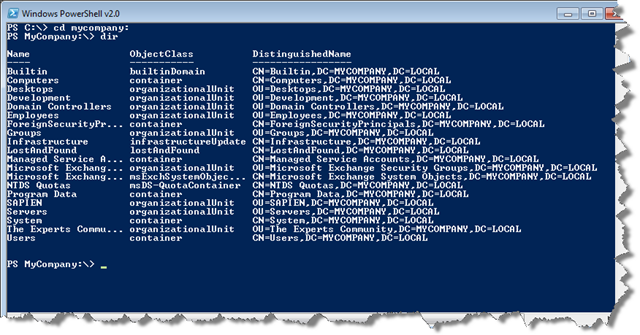
I was working on using the New-Item cmdlet to create objects in the PSdrive. Not remembering the exact syntax I decided to look at the help examples (help new-item –ex).
![captured_Image.png[7]](https://jdhitsolutions.com/blog/wp-content/uploads/2010/01/captured_Image.png7_.png "captured_Image.png[7]")
I thought, well isn’t that convenient, Active Directory examples. But I wondered…I didn’t recall examples like this before. I switched back to C: and looked at help examples again:
![captured_Image.png[9]](https://jdhitsolutions.com/blog/wp-content/uploads/2010/01/captured_Image.png9_.png "captured_Image.png[9]")
What do ya know! File system examples!! I tried this with a few other cmdlets like Get-ChildItem and Get-ACL, switching between the file system and the AD drive. When in the AD drive I got AD specific examples. How sweet is that!
But before you get carried away by the moment, I tried this with other PSDrives like HKLM: and CERT: but with no change. They show the same examples you get when in the file system. I love the idea of a “smart” PSDrive provider. So far ActiveDirectory is the only one I’ve discovered.
Not being a developer I can’t say how difficult implementing something like this is, but if you are a third party developer offering PowerShell solutions with your own provider, I hope you follow the lead of the AD team.

Just checked the IIS provider and it isn’t smart like AD.
I believe this is an issue with how provider help was implemented V1 vs V2. In version 2 the ability to add custom provider help was added. This abiility didn’t exist in V1 (only the generic help for item cmdlets were returned regardless of which provider was used). I could be wrong, my conclusion is based on a reading of this blog post and some questions I had asked when researching creating a provider: http://blogs.msdn.com/powershell/archive/2009/05/28/adding-custom-cmdlet-help-for-providers.aspx
Now, why hasn’t the registry provider been updated in V2 to take advantage of this feature is another question — perhaps you should log a Connect Item.
Thanks for the info. I certainly suspected it was a v2 thing, which is why I was disappointed the new IIS provider didn’t support it. I’m pretty sure it is an optional feature and not necessarily a bug. And at this point I’m not sure how Microsoft will be handling bug fixes and updates to PowerShell v2.
BTW, I also checked the SQL PSDrive provider and doesn’t offer provider specific examples.