With the release of PowerShell 4.0, it is possible you might end up with a mix of systems in your environment. I know I do because I do a lot of writing, testing and development that requires multiple versions in my test network. Recently I was doing some Group Policy work when I thought about WMI filters. A WMI filter is a way to limit Group Policy to machines that meet certain criteria. I thought it would be useful to have a WMI filter that could determine if the computer was running PowerShell 3 or 4. Why? Well one reason would be so that v4 machines would update help from a local v4 source and likewise for v3. So I started looking a developing a WMI query.
That led to the development of this:
Function Get-WMIPowerShell {

[cmdletbinding()]
Param(
[Parameter(Position=0,ValueFromPipeline=$True)]
[alias("cn","pscomputername")]
[string[]]$Computername = $env:COMPUTERNAME
)

Begin {
    Write-Verbose -Message "Starting $($MyInvocation.Mycommand)"

    $wmiParam=@{
     class = 'CIM_datafile'
     filter= ""name='c:\\windows\\system32\\windowspowershell\\v1.0\\powershell.exe'"
     ComputerName= $Null
     ErrorAction= "Stop"
    }
} #begin

Process {

foreach ($computer in $computername) {
     Write-Verbose "Querying $computer.toUpper())"
     $wmiParam.Computername=$Computer
    Try {
     Get-WMIObject @wmiParam | Select @{name="Computername";Expression={$_.CSName}},
     Name,Version,FileSize,
     @{Name="Installed";Expression={$_.ConvertToDateTime($_.InstallDate)}}
    }
    Catch {
      Write-Warning "Failed to retrieve WMI information from $computername"
      Write-Warning $_.Exception.Message
    }
 } #foreach
} #process

End {
    Write-Verbose -Message "Ending $($MyInvocation.Mycommand)"
} #end

} #end function
This function uses WMI to retrieve the instance of the CIM_DATAFILE class for PowerShell.exe. I have found when querying for this class to be as specific in your query as you can. This runs pretty quickly and returns some useful information. I can even run it for a group of computers.
PS S:\> Get-WMIPowerShell -comp chi-dc01,chi-dc02,chi-dc04,chi-hvr2.globomantics.local,jdhit-dc01,novo8 | out-gridview -title "PS Version"
Which gives me this:
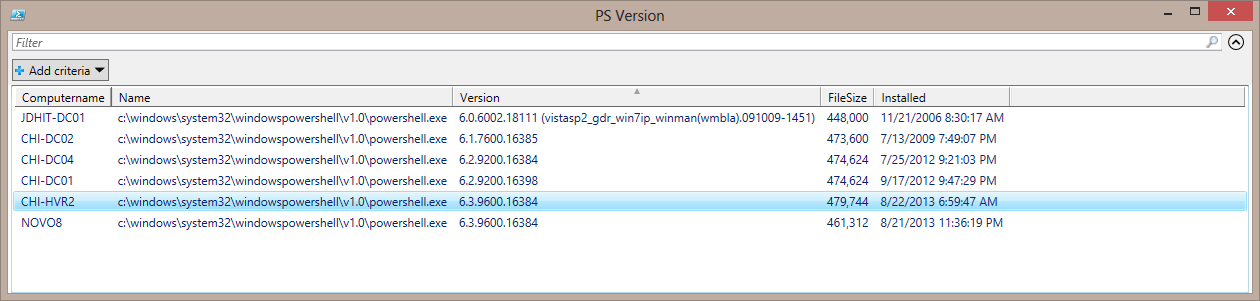
The first two machines are running PowerShell 2.0, the next 2 v3 and the last 2 v4. Now that I know this works, I can create a WMI filter with a query like this:
"Select * from CIM_Datafile where name='c:\\windows\\system32\\windowspowershell\\v1.0\\powershell.exe' AND version like '6.2%'"
This should filter only for computers running PowerShell 3.0.
I wrote this function thinking I would add support for alternate credentials. But if you don't need it, you can also get the same information using the [WMI] type accelerator.
PS S:\> [WMI]"\\CHI-DC04\root\cimv2:CIM_DataFile.Name='c:\\windows\\system32\\windowspowershell\\v1.0\\powershell.exe'"


Compressed : False
Encrypted  : False
Size       :
Hidden     : False
Name       : c:\\windows\\system32\\windowspowershell\\v1.0\\powershell.exe
Readable   : True
System     : False
Version    : 6.2.9200.16384
Writeable  : True
I needed to test and develop a SELECT query which is why I ended up with the function I did. The date information is extra and if you use Get-CIMInstance, the dates are converted for you.
$wmiParam=@{
     class = 'CIM_datafile'
     filter= "name='c:\\windows\\system32\\windowspowershell\\v1.0\\powershell.exe' AND version like '6.2%'"
     ComputerName= 'CHI-DC04'
     ErrorAction= "Stop"
    }

Get-CIMInstance @wmiParam | Select PSComputername,Name,Version,FileSize,InstallDate
Yes, I know you can get this information with Test-WSMan as well and that is certainly a much easier way. Although if by chance you still have PowerShell 1.0 in use, I don't think that will work. Anyway, there you have it. A quick way using WMI to find out the PowerShell version and a query you can use to build a WMI filter for Group Policy.
Enjoy.
UPDATE 11/14
I don't know what I was thinking with my original query. It was much more complicated than it needed to be. I've updated my code samples with a better filter. Remember when using \ in any paths, it needs to be escaped which is why you see the name as you do.