Skip to content
Menu
The Lonely Administrator
  • PowerShell Tips & Tricks
  • Books & Training
  • Essential PowerShell Learning Resources
  • Privacy Policy
  • About Me
The Lonely Administrator

Category: Scripting

Solving the PowerShell Counting Challenge

Posted on May 27, 2020May 27, 2020

A few weeks ago, an Iron Scripter PowerShell scripting challenge was posted. As with all of these challenges, the process is more important than the end result. How you figure out a solution is how you develop as a PowerShell professional. A few people have already shared their work. Today, I thought I’d share mine….

Share this:

  • Share on X (Opens in new window) X
  • Share on Facebook (Opens in new window) Facebook
  • Share on Mastodon (Opens in new window) Mastodon
  • Share on LinkedIn (Opens in new window) LinkedIn
  • Share on Reddit (Opens in new window) Reddit
  • Print (Opens in new window) Print
  • Email a link to a friend (Opens in new window) Email

Like this:

Like Loading…
Read More

PowerShell Word Play

Posted on May 19, 2020

A few weeks ago an Iron Scripter PowerShell challenge was issued that involved playing with words and characters. Remember, the Iron Scripter challenges aren’t intended to create meaningful, production worthy code. They are designed to help you learn PowerShell fundamentals and scripting techniques. This particular challenge was aimed at beginner and intermediate experience levels. I…
Share this:

  • Share on X (Opens in new window) X
  • Share on Facebook (Opens in new window) Facebook
  • Share on Mastodon (Opens in new window) Mastodon
  • Share on LinkedIn (Opens in new window) LinkedIn
  • Share on Reddit (Opens in new window) Reddit
  • Print (Opens in new window) Print
  • Email a link to a friend (Opens in new window) Email

Like this:

Like Loading…
Read More

A PowerShell Network Monitor

Posted on May 12, 2020October 12, 2021

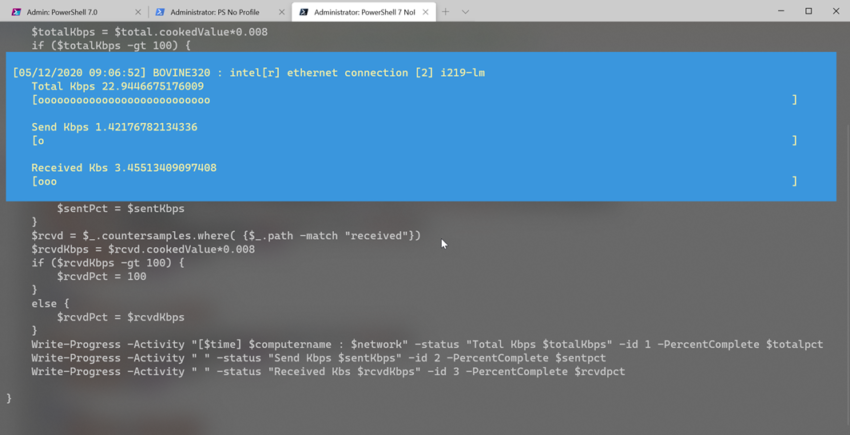
I hope you’ve been trying your hand at the scripting challenges being posted on the Iron Scripter website. The challenges are designed for individuals to do on their own to build up their PowerShell scripting skills. A few weeks ago, a challenge was posted to create a network monitoring tool using PowerShell and the Write-Progress…

Share this:

  • Share on X (Opens in new window) X
  • Share on Facebook (Opens in new window) Facebook
  • Share on Mastodon (Opens in new window) Mastodon
  • Share on LinkedIn (Opens in new window) LinkedIn
  • Share on Reddit (Opens in new window) Reddit
  • Print (Opens in new window) Print
  • Email a link to a friend (Opens in new window) Email

Like this:

Like Loading…
Read More

PowerShell 7 Scripting with the PowerShell ISE

Posted on May 11, 2020

By now, everyone should have gotten the memo that with the move to PowerShell 7, the PowerShell ISE should be considered deprecated. When it comes to PowerShell script and module development for PowerShell 7, the recommended tool is Visual Studio Code. It is free and offers so much more than the PowerShell ISE ever could….

Share this:

  • Share on X (Opens in new window) X
  • Share on Facebook (Opens in new window) Facebook
  • Share on Mastodon (Opens in new window) Mastodon
  • Share on LinkedIn (Opens in new window) LinkedIn
  • Share on Reddit (Opens in new window) Reddit
  • Print (Opens in new window) Print
  • Email a link to a friend (Opens in new window) Email

Like this:

Like Loading…
Read More

A PowerShell Remote Function Framework

Posted on May 8, 2020May 8, 2020

The other day I shared a PowerShell function to query the registry on remote computers to find installed versions of PowerShell. The function leveraged PowerShell remoting with the flexibility of using a computer name with an optional credential or existing PSSessions. The more I thought about it, the more I realized that the structure could…
Share this:

  • Share on X (Opens in new window) X
  • Share on Facebook (Opens in new window) Facebook
  • Share on Mastodon (Opens in new window) Mastodon
  • Share on LinkedIn (Opens in new window) LinkedIn
  • Share on Reddit (Opens in new window) Reddit
  • Print (Opens in new window) Print
  • Email a link to a friend (Opens in new window) Email

Like this:

Like Loading…
Read More

Get Installed PowerShell Versions

Posted on May 7, 2020May 7, 2020

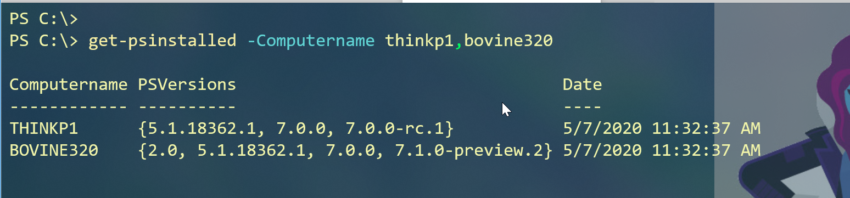
As is the norm for a typical day, I was working on one thing when I was distracted by a shiny rabbit hole (to mix some metaphors). Half a day later I have a new PowerShell function that not only might you find useful, but I think it has some nice scripting features you might…

Share this:

  • Share on X (Opens in new window) X
  • Share on Facebook (Opens in new window) Facebook
  • Share on Mastodon (Opens in new window) Mastodon
  • Share on LinkedIn (Opens in new window) LinkedIn
  • Share on Reddit (Opens in new window) Reddit
  • Print (Opens in new window) Print
  • Email a link to a friend (Opens in new window) Email

Like this:

Like Loading…
Read More

PowerShell Helper Scripts for Windows Terminal

Posted on May 1, 2020May 5, 2020

I’ve spent some time over the last few days getting my Windows Terminal setup in order. Hopefull you saw my recent post about backing up my settings.json file. I’ve also put together a few other simple PowerShell scripts that I use to make Windows Terminal even easier to use and manage. Track Version One of…

Share this:

  • Share on X (Opens in new window) X
  • Share on Facebook (Opens in new window) Facebook
  • Share on Mastodon (Opens in new window) Mastodon
  • Share on LinkedIn (Opens in new window) LinkedIn
  • Share on Reddit (Opens in new window) Reddit
  • Print (Opens in new window) Print
  • Email a link to a friend (Opens in new window) Email

Like this:

Like Loading…
Read More

Importing Pester Results into PowerShell

Posted on April 24, 2020April 24, 2020

Last week, a PowerShell scripting challenge was posted on the Iron Scripter web site.  The idea was that when you run a Pester test, you can save the results to a specially formatted  XML file. Invoke-Pester C:\scripts\sample.test.ps1 -OutputFile d:\temp\results.xml -OutputFormat JUnitXml I get this result. The challenge was to write a PowerShell command that could…

Share this:

  • Share on X (Opens in new window) X
  • Share on Facebook (Opens in new window) Facebook
  • Share on Mastodon (Opens in new window) Mastodon
  • Share on LinkedIn (Opens in new window) LinkedIn
  • Share on Reddit (Opens in new window) Reddit
  • Print (Opens in new window) Print
  • Email a link to a friend (Opens in new window) Email

Like this:

Like Loading…
Read More

PowerShell Left-Center-Right

Posted on April 20, 2020April 9, 2021

Normally,  I’d leave a post like this for a Friday Fun article. But given the situation these days, I thought some of you might like to start your week off with a little fun.  And maybe even learn a little PowerShell along the way. If your family is anything like mine, you are hopefully spending…

Share this:

  • Share on X (Opens in new window) X
  • Share on Facebook (Opens in new window) Facebook
  • Share on Mastodon (Opens in new window) Mastodon
  • Share on LinkedIn (Opens in new window) LinkedIn
  • Share on Reddit (Opens in new window) Reddit
  • Print (Opens in new window) Print
  • Email a link to a friend (Opens in new window) Email

Like this:

Like Loading…
Read More

PSDrives, Shortcuts and Links

Posted on April 15, 2020April 9, 2021

I’ll be honest. I’ve never been much of a OneDrive user. Even though I’m a great candidate given that I use multiple systems and need access to a common set of files. But for a number of reasons I’m beginning to make more of a shift to OneDrive. Part of the challenge for me has…

Share this:

  • Share on X (Opens in new window) X
  • Share on Facebook (Opens in new window) Facebook
  • Share on Mastodon (Opens in new window) Mastodon
  • Share on LinkedIn (Opens in new window) LinkedIn
  • Share on Reddit (Opens in new window) Reddit
  • Print (Opens in new window) Print
  • Email a link to a friend (Opens in new window) Email

Like this:

Like Loading…
Read More

PowerShell 7 Cross-Platform Scripting Tips and Traps

Posted on March 13, 2020

One of the reasons you want to adopt PowerShell 7 on your desktop, is that it can  be used cross-platform. Theoretically, you can write a PowerShell script or function that works on Windows, Linux, and Mac. However, this is not without challenges. In some ways, it feels like we are back to the early days…

Share this:

  • Share on X (Opens in new window) X
  • Share on Facebook (Opens in new window) Facebook
  • Share on Mastodon (Opens in new window) Mastodon
  • Share on LinkedIn (Opens in new window) LinkedIn
  • Share on Reddit (Opens in new window) Reddit
  • Print (Opens in new window) Print
  • Email a link to a friend (Opens in new window) Email

Like this:

Like Loading…
Read More

Creating Linked HTML with PowerShell

Posted on January 13, 2020January 13, 2020

Today’s post is about a niche problem or something that maybe you never considered before. And while I will share a finished PowerShell function, you may want to create your own tooling based on the techniques and concepts. The problem begins with a command like this: Get-HotFix -ComputerName $env:computername | Sort-Object Description,InstalledOn -Descending | Select-Object…

Share this:

  • Share on X (Opens in new window) X
  • Share on Facebook (Opens in new window) Facebook
  • Share on Mastodon (Opens in new window) Mastodon
  • Share on LinkedIn (Opens in new window) LinkedIn
  • Share on Reddit (Opens in new window) Reddit
  • Print (Opens in new window) Print
  • Email a link to a friend (Opens in new window) Email

Like this:

Like Loading…
Read More

Converting Lexical Timespans with PowerShell

Posted on December 18, 2019December 18, 2019

I’ve been working on a few scripting projects and the data I’m working with contains lexical timespans. Say what? You have probably seen these things. This is a string like P0DT0H0M47S to represents a timespan. They aren’t difficult for humans to read. This one says “0 days 0 hours 0 minutes 47 seconds”. The format…

Share this:

  • Share on X (Opens in new window) X
  • Share on Facebook (Opens in new window) Facebook
  • Share on Mastodon (Opens in new window) Mastodon
  • Share on LinkedIn (Opens in new window) LinkedIn
  • Share on Reddit (Opens in new window) Reddit
  • Print (Opens in new window) Print
  • Email a link to a friend (Opens in new window) Email

Like this:

Like Loading…
Read More

Managing the Recycle Bin with PowerShell

Posted on December 3, 2019December 2, 2019

A while ago, I posted an Iron Scripter challenge asking you to write some PowerShell code for working with items in the recycle bin. You were asked to calculate how much space the recycle bin is using and then restore a file. If you’d prefer, stop reading this post, check out the challenge and see…

Share this:

  • Share on X (Opens in new window) X
  • Share on Facebook (Opens in new window) Facebook
  • Share on Mastodon (Opens in new window) Mastodon
  • Share on LinkedIn (Opens in new window) LinkedIn
  • Share on Reddit (Opens in new window) Reddit
  • Print (Opens in new window) Print
  • Email a link to a friend (Opens in new window) Email

Like this:

Like Loading…
Read More

The PowerShell Magic 8 Ball

Posted on October 28, 2019October 27, 2020

[I updated this article to reflect minor changes in the code and the release of PowerShell 7. This article was originally published 28 October, 2019]. Last year I shared some PowerShell code on Twitter about this time of year. I have a short script that uses Windows Presentation Foundation (WPF) to create a spooky graphical…

Share this:

  • Share on X (Opens in new window) X
  • Share on Facebook (Opens in new window) Facebook
  • Share on Mastodon (Opens in new window) Mastodon
  • Share on LinkedIn (Opens in new window) LinkedIn
  • Share on Reddit (Opens in new window) Reddit
  • Print (Opens in new window) Print
  • Email a link to a friend (Opens in new window) Email

Like this:

Like Loading…
Read More
  • Previous
  • 1
  • …
  • 4
  • 5
  • 6
  • 7
  • 8
  • 9
  • 10
  • …
  • 38
  • Next
reports

Powered by Buttondown.

Join me on Mastodon

The PowerShell Practice Primer
Learn PowerShell in a Month of Lunches Fourth edition


Get More PowerShell Books

Other Online Content

github


PluralSightAuthor

Active Directory ADSI Automation Backup Books CIM CLI conferences console Friday Fun FridayFun Function functions Get-WMIObject GitHub hashtable HTML Hyper-V Iron Scripter ISE Measure-Object module modules MrRoboto new-object objects Out-Gridview Pipeline PowerShell PowerShell ISE Profile prompt Registry Regular Expressions remoting SAPIEN ScriptBlock Scripting Techmentor Training VBScript WMI WPF Write-Host xml

©2026 The Lonely Administrator | Powered by SuperbThemes!
%d