Skip to content
Menu
The Lonely Administrator
  • PowerShell Tips & Tricks
  • Books & Training
  • Essential PowerShell Learning Resources
  • Privacy Policy
  • About Me
The Lonely Administrator

Turning CLI Tools into PowerShell Tools Deep Dive Demos

Posted on October 24, 2011

Last week I did a presentation at the PowerShell Deep Dive in Frankfurt about turning command line tools into PowerShell tools. A video recording should be posted later. But in the meantime, here is a copy of my slide deck, in PDF and a zip file with my demos and scripts. I have some followup posts I'll publish later.

The bottom line is that with not much effort and some basic PowerShell knowledge you can turn any command line tool into a PowerShell tool that writes objects to the pipeline. For example, I can take the NBTSTAT -n command:
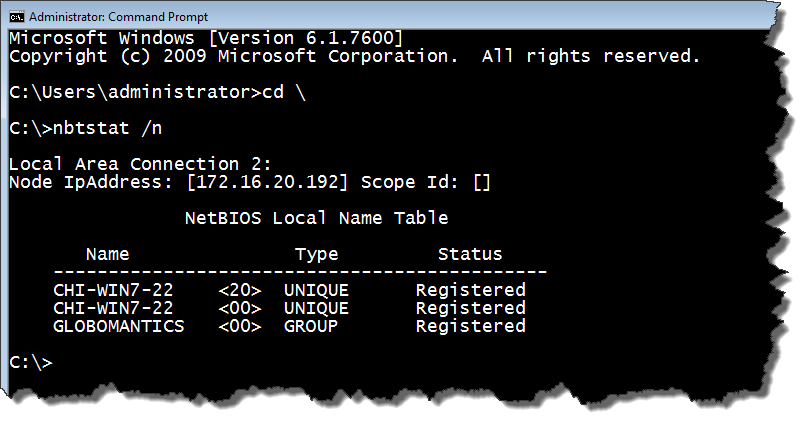
and turn it into a PowerShell command:
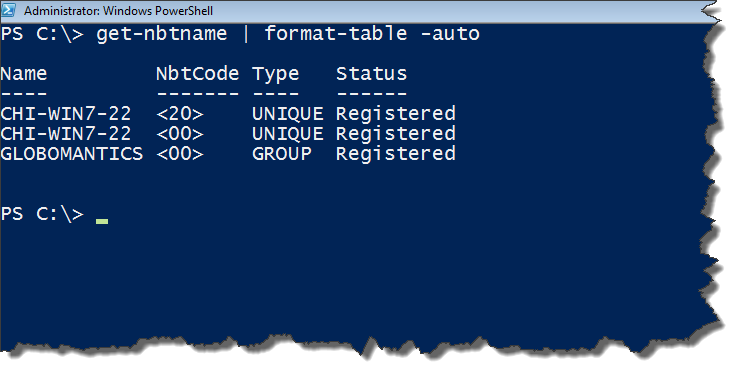
The simple function is included in the zip file.

Download the Turn Command Line Tools into PowerShell Tools presentation and the CLI-to-PSH-Demos.

Share this:

  • Print (Opens in new window) Print

Like this:

Like Loading…

Related

2 thoughts on “Turning CLI Tools into PowerShell Tools Deep Dive Demos”

  1. Pingback: Episode 170 – Jeffery Hicks Manages Windows Server with PowerShell « PowerScripting Podcast
  2. Pingback: Video: Jeffery Hicks – Turn Command-Line Tools into PowerShell Tools « Dmitry’s PowerBlog: PowerShell and beyond

Comments are closed.

The PowerShell Practice Primer
Learn PowerShell in a Month of Lunches Fourth edition


Get More PowerShell Books

Other Online Content

github


PluralSightAuthor

Active Directory ADSI Automation Backup Books CIM CLI conferences console Friday Fun FridayFun Function functions Get-WMIObject GitHub hashtable HTML Hyper-V Iron Scripter ISE Measure-Object module modules MrRoboto new-object objects Out-Gridview Pipeline PowerShell PowerShell ISE Profile prompt Registry Regular Expressions remoting SAPIEN ScriptBlock Scripting Techmentor Training VBScript WMI WPF Write-Host xml

©2026 The Lonely Administrator | Powered by SuperbThemes!
%d