Today's Friday Fun post, as most of these are, is a little silly and a little educational. Because I obviously am avoiding getting any real work accomplished, I worked on a little project that would add a border around a string of text. I often write formatted text to the screen to display information and thought it would be nice to be able to add sometime of border.
My goal was to take a string like "Friday Fun" and write it to the console centered in a bordered box - something like this:
**************
* Friday Fun *
**************
I had to get the length of the string and add 2 to it to allow for a space on either side. The top and bottom lines were as simple as writing the character times the length.
"*"*20
The middle part was simply a matter of concatenating the character and the text.
$body = "$Character $text $Character"
I then used a here string to create the final result.
#define a here string with the final result
$out = @"
$tabs$line
$tabs$body
$tabs$line
"@
And yes, I included a feature where the result could be tabbed or indented a certain number of times. You can find the complete function as a Github gist.
https://gist.github.com/jdhitsolutions/0bbd6b64c107d7da23e65359c4d0e25c
Here are some examples of the function in action.
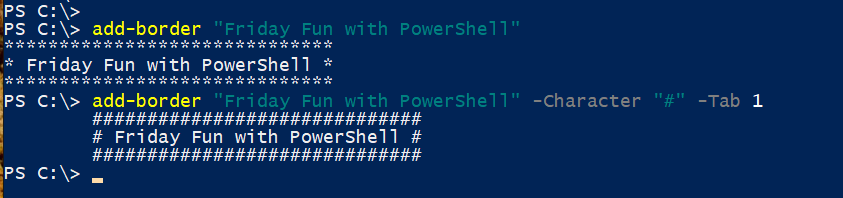
You can border any single line of text. For example, I have a short function to get some basic system information.
Function Get-Status {
    [cmdletbinding()]
    Param(
        [string]$Computername = $env:computername,
        [switch]$AsString
        )
    $OS = Get-Ciminstance -ClassName Win32_OperatingSystem -ComputerName $computername
    $uptime = (Get-Date) - $OS.lastBootUpTime
    $pctFreeMem = ($os.FreePhysicalMemory / $os.TotalVisibleMemorySize)*100
    $CDrive = Get-CimInstance -ClassName Win32_LogicalDisk -Filter "deviceid='c:'" -ComputerName $computername
    $pctFreeC = ($CDrive.FreeSpace/$CDrive.size)*100
    $status = [PSCustomObject]@{
        Computername = $OS.pscomputername
        Uptime = $uptime
        PctFreeC = [math]::Round($pctFreeC,2)
        PctFreeMem = [math]::Round($pctFreeMem,2)
    }
    if ($AsString) {
        "{0} Uptime:{1} %FreeC:{2} %FreeMem:{3}" -f $status.computername,$status.uptime,$status.PctFreeC,$status.PctFreeMem
    }
    else {
        $status
    }
}
I included a parameter to write the result as a formatted string. I can now put a line like this in my PowerShell profile script:
. C:\scripts\GetStat.ps1
. C:\scripts\Add-Border.ps1

cls
write-host "`n"
get-status -AsString | add-border | write-host -ForegroundColor Green
write-host "Time to get to work, Jeff." -ForegroundColor yellow
write-host "`n"
cd c:\
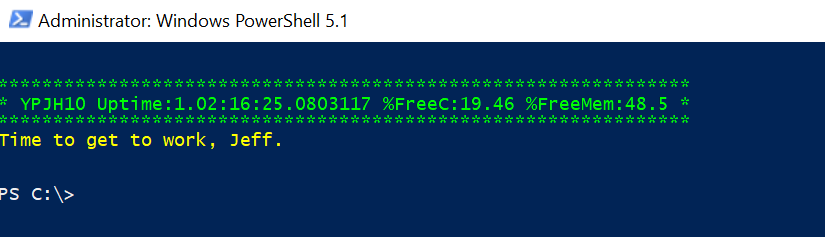
Perhaps you can think of other fun ways to add borders to your script or command output. If so, I'd love to hear about it. Enjoy!
Hello Jeffrey
Nice script, i think i’ll use it !
But, when you do both InsertBlanks and Tab, only the first line of the Body here-strings si tabbed, not the rest.
Here is how i deal with it :
Process {
Write-Verbose “[$((Get-Date).TimeofDay) PROCESS] Processing ‘$text'”
#get length of text
$len = $text.Length
Write-Verbose “[$((Get-Date).TimeofDay) PROCESS] Using a length of $len”
#define a horizontal line
$line = $Character * ($len+4)
$tabs = “`t”*$tab
if ($insertBlanks) {
Write-Verbose “[$((Get-Date).TimeofDay) PROCESS] Inserting blank lines”
$body = @”
$tabs$character $((” “)*$len) $character
$tabs$Character $text $Character
$tabs$character $((” “)*$len) $character
“@
}
else {
$body = “$tabs$Character $text $Character”
}
$out = @”
$tabs$line
$body
$tabs$line
“@
#write the result to the pipeline
$out
} #process
Yeah, that’s an annoying bug. Your workaround helped. I’ve updated the gist.