The other night I presented for the Mississippi PowerShell User Group on how to get started using Windows Terminal. This has been my go-to PowerShell console for quite a while. I use Windows Terminal for everything. During the talk a question came up about starting a session with split panes. This is a very cool feature. I can have a single tab split into different profiles. There isn't an official way to accomplish this, but when using PowerShell I can use the following work around. Ok. You can call it a hack.
First off, in your Windows Terminal settings.json file, you need to define a key binding that opens a desired profile.
{
    "command": {
        "action": "splitPane",
        "split": "auto",
        "profile": "Windows PowerShell No Profile",
        "startingDirectory": "C:\\",
        "tabTitle": "PS Clean"
    },
    "keys": [
        "ctrl+shift+<"
    ]
}
This key combo will open my Windows Terminal profile that launches Windows PowerShell with no profile.
Next, I'll edit my Windows PowerShell profile script. I could do the same thing for PowerShell 7. But my goal is that when I launch Windows PowerShell in Windows Terminal I'll get a split screen. One panel has my profile loaded and the other is clean.
At the end of the profile script, I add this code.
if ( $env:wt_session) {
    #split the screen
    $wshell = New-Object -ComObject Wscript.Shell
    $wshell.sendkeys("^+<")
} #in a WT Session
Yes. This is a SendKeys VBScript hack. But it works!
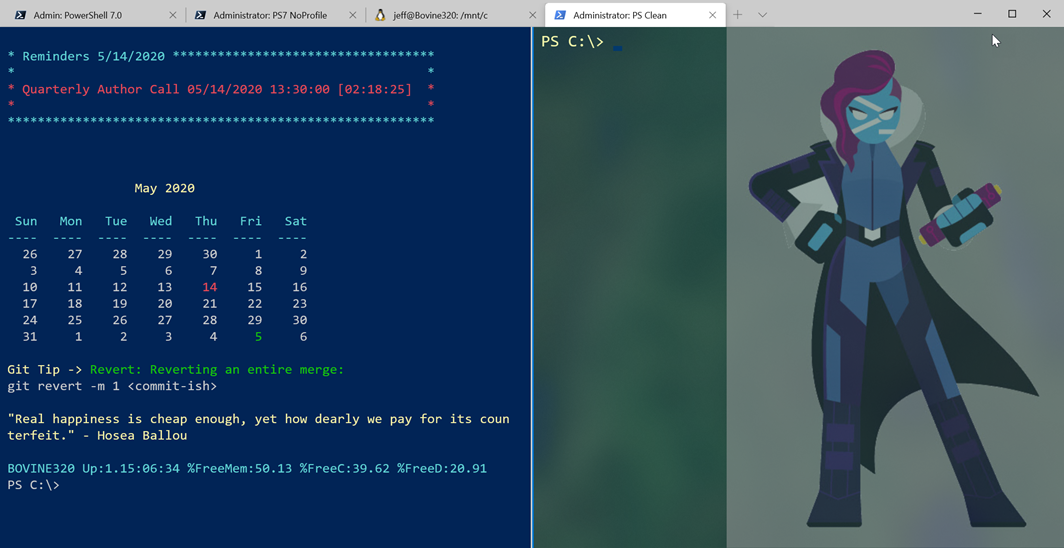 The tab title will change depending on which PowerShell panel has focus.
You could achieve similar results by using wt.exe but personally, I find it a bit clunky to use and it will launch a new instance of Windows Terminal. I'm hoping that some future version will have a better solution. But in the meantime, at least for PowerShell, I have something that works.
As I’ve mentioned before, the lack of “open as a different user” such as my admin account is a game stopper for Windows Terminal. I’ve started using the compatibility mode for Office365, and AzureAD so that I can work in Windows Terminal with PowerShell 7.
Instead of running ConEMU for multiple tabs, I’m loading WT in what I call O365 mode while I run my admin account straight from in PS 7.
I am under no illusion that Windows Terminal is right for everyone. Even for me there are a number of areas I hope they address in future releases.
If you’re using PowerShell with Office 365 and AzureAD it doesn’t matter who PowerShell is running as, does it? I use Windows Terminal everyday with them and with Windows PowerShell and it works pretty well.